

Building an AI Stack Without Breaking Your Brain
What “AI brain fry” looks like and how to think about AI tools in layers, workflows, and actual business value to tame the chaos


I have a confession.
These days, at any given moment, I have approximately 15 AI tools running on my computer simultaneously: Wispr Flow, Granola, Fireflies, Notion, Comet, Codex, Claude Chrome extension, Gemini, Perplexity, Midjourney, ChatGPT, Loveable, Replit, Zapier, and Jasper to be exact.
Sure, I could call it research. I mean, this substack won’t write itself … well actually if I deployed an an AI agent, it could, but I digress …
It feels like I’m collecting AI tools the way my 14 year-old daughter collects emotional support water bottles — one for every situation, deeply convinced each one is solving a specific problem, most of them sitting untouched after the first week.
The problem isn’t that there aren’t enough good AI tools, it’s that there are too many, and they’re all slightly different, cost money, and bouncing between them all day is making me a bit of a maniac.
Wait, Harvard Has a Name for This?
Harvard Business Review surveyed 1,488 full-time U.S. workers and found that a chunk of them were experiencing what the researchers called AI Brain Fry — mental fog, headaches, slower decision-making. The kind of feeling where you’ve been “working” all day and have nothing to show for it.
Prevalence varied a lot by role. Only 6% of people in legal reported it. Marketing? 26%. Highest of any function … go figure 😞.
After marketing: people ops, operations, engineering, finance, and IT. So basically everyone except the lawyers, who are dealing with their own separate AI crisis.
The article’s finding that AI tools are intensifying work rather than simplifying it didn’t exactly shock me. Every new subscription comes with hidden overhead. From remembering what the tool does, to exactly when to reach for it, how to prompt it, how to connect or automate it, where your files ended up, and whether you’ve hit the monthly limit. It honestly feels like a part-time job managing the stuff that was supposed to help you do your actual job.
So What Should Actually Be in Your Stack?
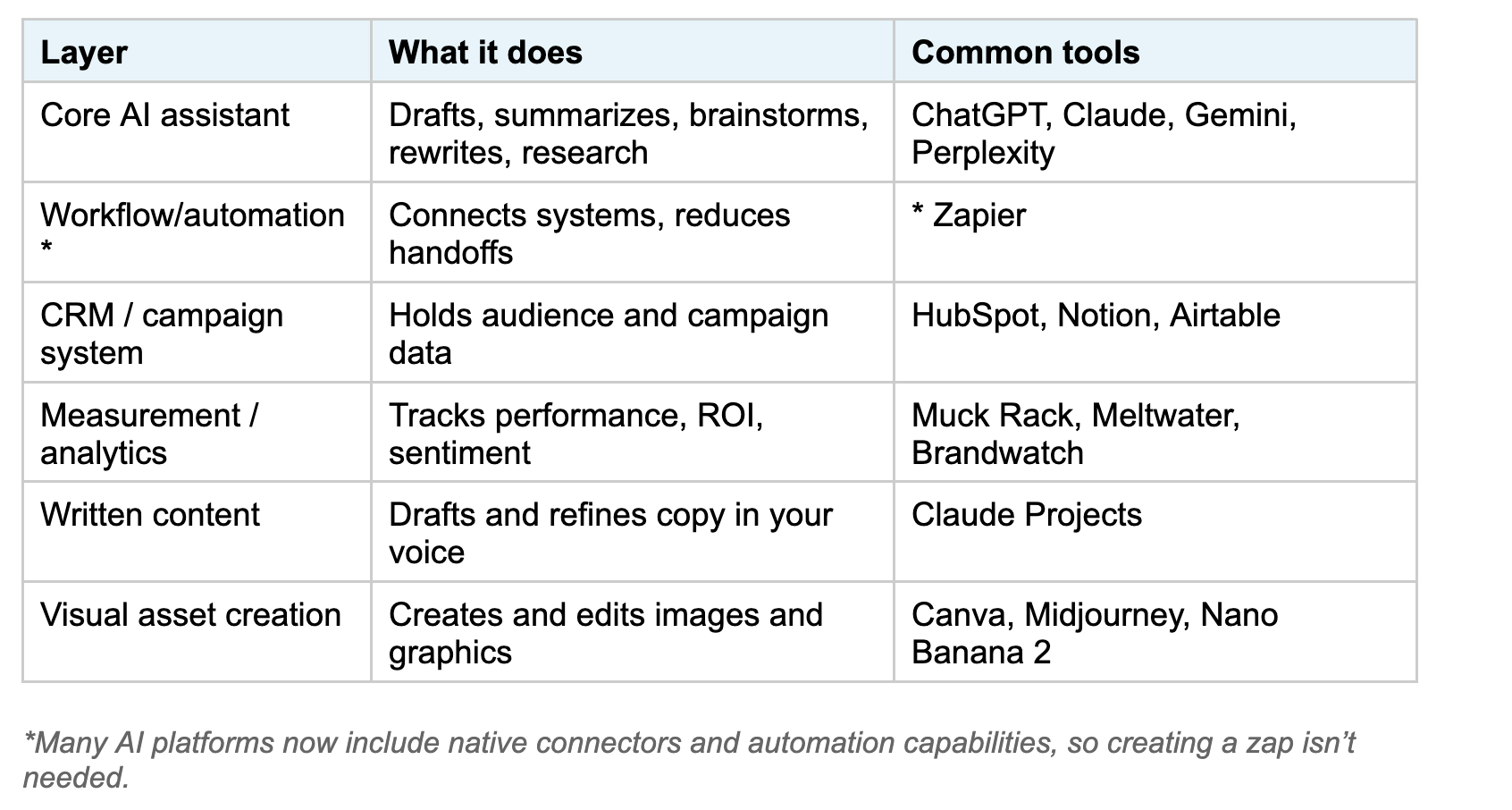
One thing I’ve found helpful amid the constant flood of AI tool announcements is thinking about AI stacks in layers instead of individual products. That shift alone made the landscape feel much less overwhelming and helped me stop treating every new launch like an urgent decision.
The basic framework is fairly simple: a handful of core layers, with a small number of tools serving each one. Not the entire AI app store.
The specific tools inside each layer will depend on your organization, budget, compliance requirements, and, realistically, what IT will approve. But this framework helped me recognize where I was doubling up unnecessarily and where I had actual gaps.
The Nice-to-Haves
More advanced PR intelligence platforms, SEO optimization suites, more advanced design and video tools, audience research platforms, niche automations. These can absolutely add value when they solve a defined problem inside an already-functioning process. Buuuuut, they’re also the category most likely to drain your budget while convincing you you’re becoming more productive.
The filter I’ve started using is fairly simple: Does this tool clearly improve speed, quality, consistency, or measurability?
If the answer feels fuzzy, there’s a good chance I’m keeping it out of habit, anxiety, or fear of missing something. That’s been a surprisingly useful gut check for me.
🧪 Beta Lab: Building Workflows
Goal: Figure out which AI workflows are actually worth building and which ones I just thought sounded good.
Tools: Claude, Perplexity, Notion, Granola/Fireflies, ChatGPT, Zapier, Canva, Muck Rack
The Experiment: I looked at my 15-tool situation and made myself document what I’m actually using, not what I downloaded in a determined New Year, New You frenzy in January.
The Results: These workflows and tools made the cut.
Workflow #1: Press Announcement Plan
Here’s the actual sequence I use now:
Notion — for building out the plan and housing the structure
(🎁 Bonus: Here’s a PR announcement campaign template *here. Just hit copy and then tailor it to your own needs.)
Claude — for assistance in drafting the release
Perplexity — for verified research to sharpen media angles
Muck Rack — for pulling media lists and monitoring coverage
Canva — for asset development
Zapier + Airtable —for connecting/automating. So, for example, once a release is approved in Notion, one trigger then prompts a Slack notification to the team, sends a draft to Muck Rack, and saves all assets saved to the shared drive, for example.
(Enterprise teams run this same logic on platforms like Workato or MuleSoft. For smaller businesses, Zapier does the same job for a fraction of the cost and drawn-out IT implementation process.)
Workflow #2: Talking Points and Q&A Development
ChatGPT — for creating executive and customer personas (custom GPTs)
Granola or Fireflies — for recording calls/transcriptions of meetings
Yes, I see the 🐘 in the room. I just spent this entire post arguing for a leaner stack, and here I am adding tools. I know. But hear me out.
Recording and transcription tools have also been getting some well-deserved scrutiny lately — consent issues, compliance concerns, and employees finding out they’ve been recorded without knowing. It’s a real conversation and not one to brush past. My take: these tools are genuinely useful for comms work, but only if your legal team has signed off and everyone on the call knows it’s being recorded.
And, for what it’s worth, I’d put this in the “nice-to-have” category, not the core stack. It’s useful when the workflow calls for it, but not something that needs to run all the time.
Claude — for feeding the transcription file(s) and any other pertinent documents or website links related to the topic. Then you prompt it to draft 15–20 targeted questions, as well as a one-page document of focused talking points.
ChatGPT personas — for taking the questions Claude devises and running it through the personas to tailor the talking points for varied stakeholder perspectives.
Notion — for housing all of it
It’s also worth mentioning that NotebookLM is a genuinely great AI tool for this type of work. You can upload multiple documents, links, and source materials, and it will analyze across all of them, surfacing themes, questions, and connecting dots in really helpful ways. It’s also able to read links that can be blocked by authentication walls that Claude can’t read.
✏️ Your 20-Minute Homework/Lean Stack Audit
A quick gut check if you want to actually do something about this:
Step 1: List every AI tool you’re currently subscribed to or have installed, including the random ones you read about and got excited to download but haven’t used since the New Year/New You January engery faded.
Step 2: For each one, answer: What workflow does this support? When did I last use it? How much does this subscription cost?
Step 3: Apply this filter: Does it improve at least one of the four of these for me—speed, quality, consistency, and/or measurability?
The strange thing about AI work right now is that most of us aren’t actually suffering from a lack of capability. We’re suffering from too much possibility. Too many tabs open. Too many tools promising transformation. Too many people online acting like if you aren’t testing every new platform within 48 hours, you’re already behind. But most communications work still comes down to the same core things it always has: clear thinking, strong judgment, good instincts, organized systems, and understanding people. AI can absolutely help with that. Sometimes dramatically. But at a certain point, the goal stops being building the biggest stack and starts being building one you can actually think inside of without frying your own brain in the process.
What are your must-have AI tools and the ones you thought you’d use every day but haven’t touched since January? Drop it in the comments.
You Beta Believe It is a newsletter for communications professionals about learning AI in public, in real time. If this one made you think or you enjoyed it, please share it!